
Resolving Transactions
Edited
Resolving a transaction means indicating the reason why the transaction was voided. This helps provide documentation for communication and auditing purposes. Once a transaction has been voided, it will appear under the Voided status, where you can choose to resolve the transaction.
Log in to the application and then select the Voided status from the Current Transaction Summary on the Dashboard page.
Select View for the transaction you wish to resolve.
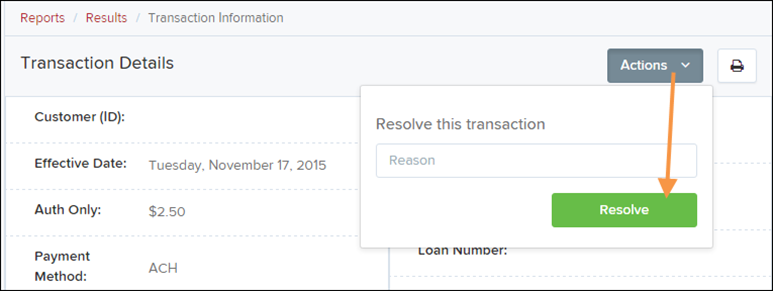
From the Transaction Details page, select Actions.
Enter a reason for resolving the transaction. For example, the transaction was deposited in the wrong account.
Click Resolve.
The transaction will now appear under the Resolved status in the Current Transaction Summary.
Was this article helpful?
Sorry about that! Care to tell us more?