
Notifications on RDC Complete
Remote Deposit Complete uses notifications to keep users informed about the status of their deposits. Notifications let you know when processing steps such as MICR repair, keying, and balancing have been completed and whether the deposit was successfully processed.
The Deposit Results report can also help identify items that may need additional attention.
If notifications are enabled and an email address is saved in the user’s profile, an email notification will be sent to the user who created the deposit and any other designated recipients.
A notification may be sent in the following situations:
The deposit was approved with no errors
The deposit was approved with adjustments
The deposit was rejected
An item needs to be rescanned
Duplicate items were detected in the deposit
Rejected items were found in the deposit
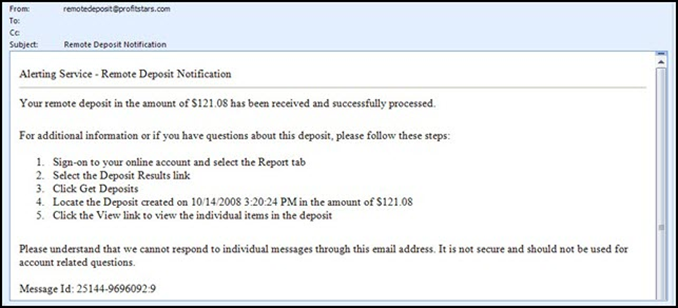
If a deposit contains items that need to be rescanned, the deposit will reopen automatically. The user will need to correct the issue and resubmit the deposit for processing.
Deposit Statuses
Each deposit in Remote Deposit Complete will display a status indicating where it is in the processing workflow.
Status | Definition |
|---|---|
Deleted | The entire deposit was deleted by someone in your organization before it was closed. Once a deposit has been closed, it cannot be deleted. No items from the deposit will be processed. |
Deposited | All checks in the deposit were processed successfully. The deposit is balanced and contains no errors. The items have been approved and an email notification has been sent. |
Deposited with Adjustment | One or more checks required an adjustment that changed the total deposit amount. The deposit was still processed and an email notification was sent. |
Open for Scanning | The deposit has been created but is still open. Additional checks can be scanned into the deposit until it is closed. |
Partial Deposit | One or more checks were removed from the deposit due to duplicates or rejected items. The remaining items were processed and an email notification was sent. |
Rejected | The entire deposit was rejected. This may happen if the adjustment amount exceeds limits set by the bank or if all items in the deposit were rejected (for example, if they were duplicates). |
Submitted | The deposit has been closed and submitted for processing. The system is reviewing the items for accuracy and potential errors before final processing is completed. |
These statuses help users track the progress of their deposits and determine if any action is needed.